

Bedrock Observer
A read-only add-on for Bedrock Dedicated Server that reports players and the world as one line of JSON, for debugging and AI-agent play.

Compatibility
| Edition | Bedrock Edition |
|---|---|
| Minecraft versions | 1.26.50 |
| Pack types | Behavior pack, Resource pack |
| Experimental features | Not needed |
| License | MIT |
Download
Download directly from this site
be-observer-1.0.1.mcaddon
SHA-256: 686c8e715420dc25c6988b2fcc64985fb6702eb03dda581587f28631d38c445b
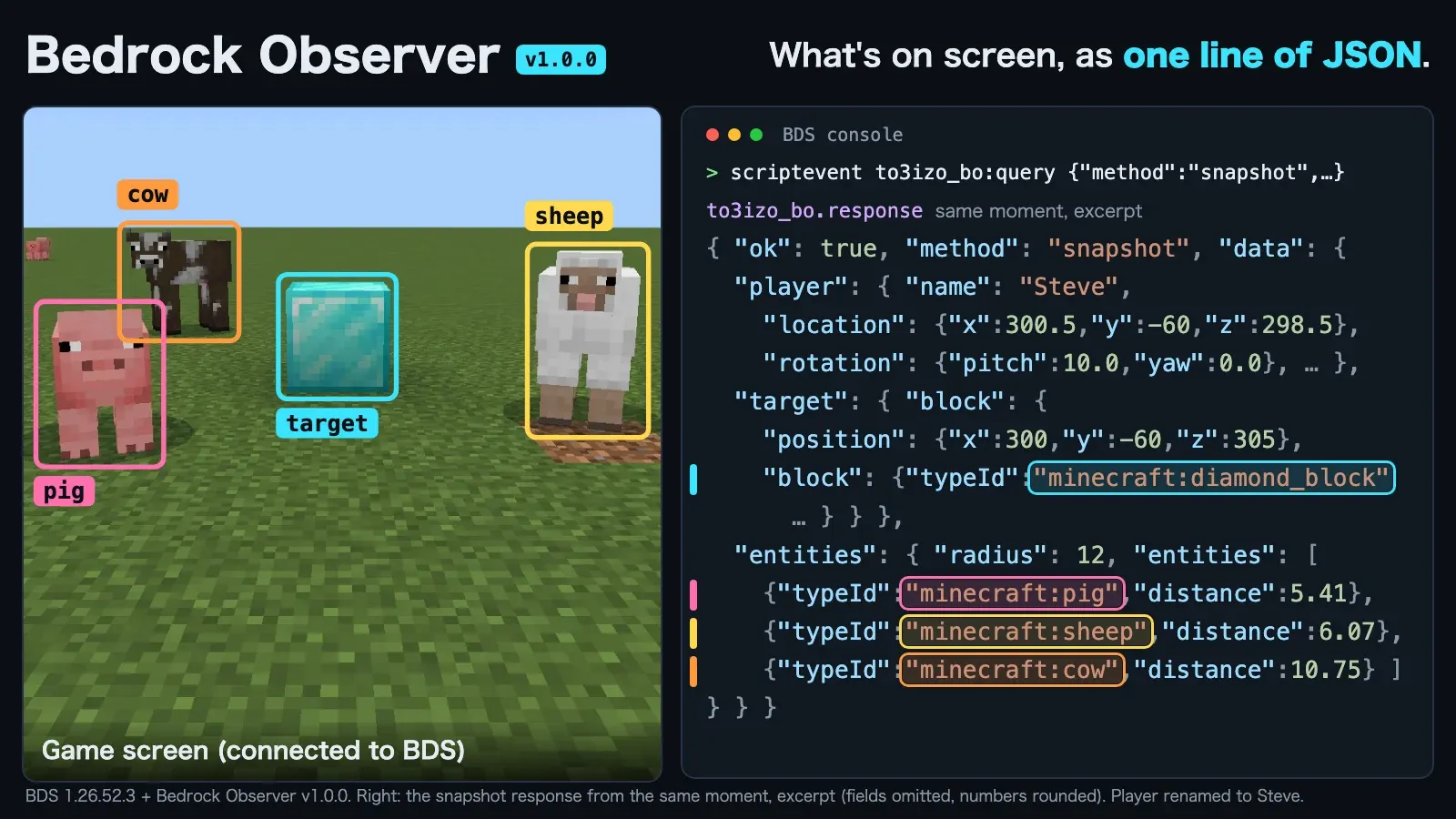
Bedrock Observer is a read-only observation add-on made only for Minecraft Bedrock Dedicated Server (BDS). External tools — AI agents that play Bedrock, test scripts, people debugging add-ons — send a JSON request, and the add-on answers with one line of JSON on the server’s standard output. It reports where players are and what they see, blocks, nearby entities, effects, ground height, scoreboards, and game events as they happen.
Please read first
This is not an add-on for playing. It is meant to run on a dedicated server (BDS) and be used from an external tool. Client-hosted worlds and Realms are not supported. Observations include player names, positions and inventories, so read “Notes” below before installing it on a server other people join.
Features
- Read-only. It never changes the world: it runs no commands, writes no values and loads no chunks.
- Tool-independent. Plain
/scripteventin, plain log lines out. No AI model, MCP server or HTTP is assumed. - Bounded. Every request has size, count, radius and distance limits, reported by
capabilities. - Stable APIs only. It uses
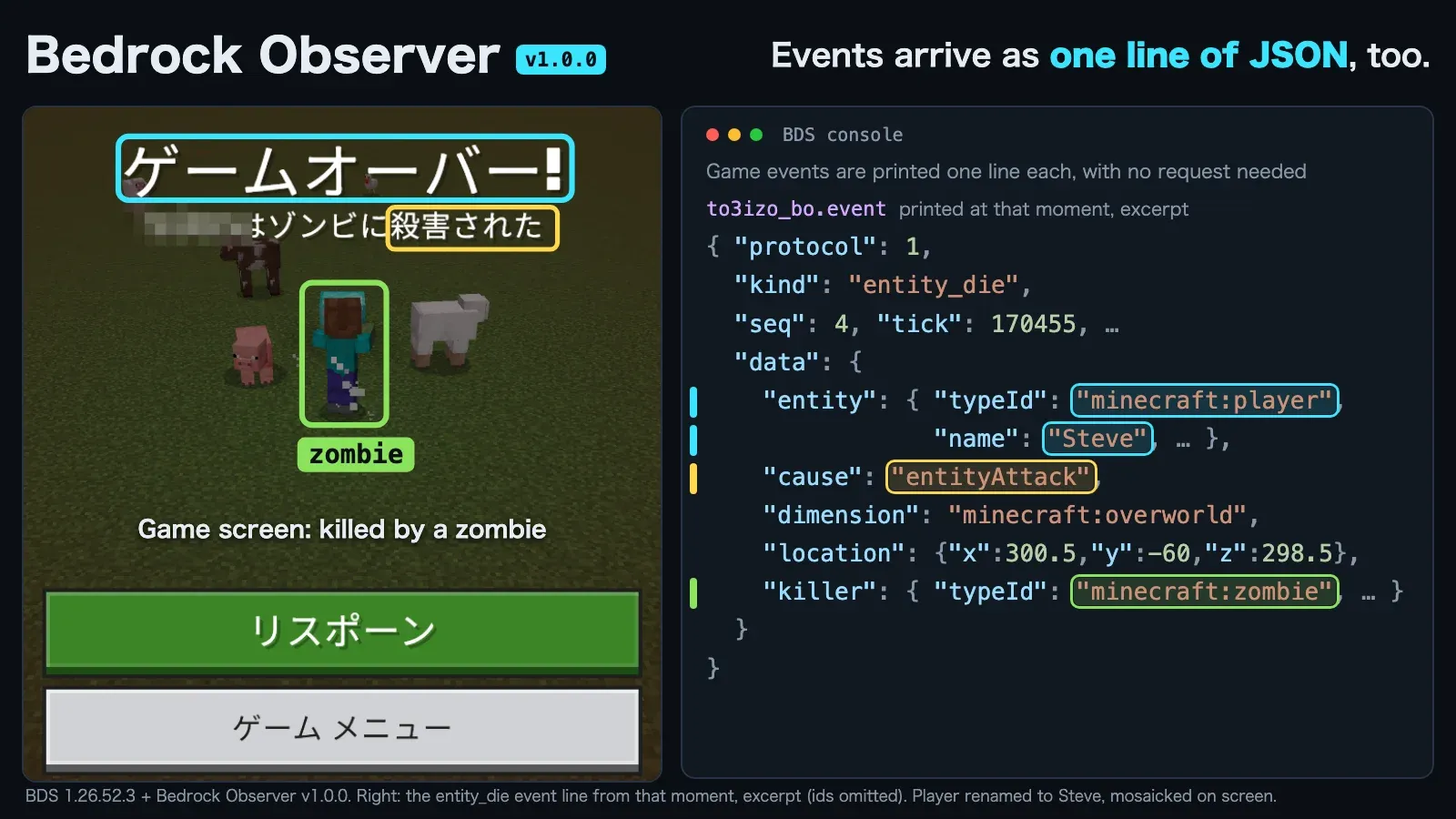
@minecraft/server2.10.0, with no experimental toggles and no beta APIs. - Game events too. Joins, leaves, spawns, deaths involving players, and dimension, game mode and game rule changes are printed one per line, with no request needed.
What it can observe
| Method | Answers |
|---|---|
capabilities |
Versions, methods, sections, limits and defaults — call this first |
players |
Players in the world |
player |
Position, head, rotation, view direction, velocity, movement flags, game mode; optional health, inventory, equipment, effects, time |
block / blocks |
Blocks by coordinates (unloaded and out-of-bounds are told apart from air) |
target |
The block (and optionally the entity) a player is looking at |
entities |
Entities near a player or a point, sorted by distance; filters by type, family, name and tag |
entity |
One entity by id |
top / tops |
The topmost block of a column — the ground height; tops as a compact height map |
scoreboard |
Objectives, the scores of one objective, or one player’s scores |
snapshot |
Several of the above for one player, in one response |
events |
Recent game events again |
Some things are not available: chat messages and command use (there is no stable API), screenshots, and input of any kind. Anything that would change the world is out of scope by design.
How to use it
On the BDS console, send a request like this (no leading /; ASCII only, and write other characters as \uXXXX).
scriptevent to3izo_bo:query {"requestId":"c1","method":"capabilities"}
scriptevent to3izo_bo:query {"requestId":"p1","method":"player","params":{"player":{"name":"Steve"},"include":["health","effects"]}}
Each request is answered by exactly one line on standard output (BDS adds its own timestamp before it).
to3izo_bo.response {"protocol":1,"requestId":"p1","ok":true,"method":"player","tick":144897,"session":"rohuvqp7","seq":4,"time":1792311918513,"data":{"id":"-8589934591","name":"Steve",...}}
Match responses to requests by requestId. Errors come back as "ok":false with a stable error.code. Game events are written without a request as to3izo_bo.event {...} lines.
From a player’s chat, an operator can send the same request without cheats as a command whose argument is the JSON in double quotes, with every inner " written as \".
/to3izo_bo:query "{\"requestId\":\"p1\",\"method\":\"player\"}"
/scriptevent to3izo_bo:query {...} also works from chat, but needs cheats on as well. Sending a long command disconnects that player, so keep the whole command under about 448 characters.
Using it from a tool
The add-on only reads the world and writes lines; a tool sends requests and collects the lines. Run BDS with its console connected to the tool.
| Where the tool runs | Sending requests | Collecting responses |
|---|---|---|
| On the BDS host | Write scriptevent to3izo_bo:query {...} to BDS’s standard input |
Read standard output (or its log) |
| On another machine (e.g. an agent on a Mac, BDS in a Windows VM) | Send to the console through the VM’s own channel, or type /to3izo_bo:query "…" into an operator’s chat |
Read the log through the same channel |
The add-on has no network transport. If lines must travel over a network, forward them with a program outside Minecraft.
How to install
-
Download the
.mcaddonfile from “Download” below and unzip it as a zip file (it containsbe-observer_BPandbe-observer_RP). -
Copy
be-observer_BPinto<BDS>/behavior_packs/andbe-observer_RPinto<BDS>/resource_packs/. -
Enable them in the world: add the pack UUID and version to
worlds/<level>/world_behavior_packs.jsonandworld_resource_packs.json.world_behavior_packs.json: [{"pack_id":"cbe4cdb9-3dc0-43c3-9750-a100b27a414e","version":[1,0,1]}] world_resource_packs.json: [{"pack_id":"3d21d349-fedb-4dd4-8b7c-a7f130ea5fe7","version":[1,0,1]}] -
Set
content-log-console-output-enabled=trueinserver.propertiesand start the server (otherwise script output never reaches standard output). If the log shows[Scripting] [be-observer] scripts loaded, it worked.
Requirements
- Bedrock Dedicated Server (verified: Windows, 1.26.52.3), game version 1.26.50 or later. Linux BDS is expected to work but is untested.
- Client-hosted worlds and Realms are not supported.
- Includes both a behavior pack and a resource pack. No experimental features are needed.
Notes
Observations include player names, positions and inventories, and they are written to the server’s standard output. The server console and every operator can observe every player; other players cannot send requests. Tell the people who join your server about this before you install it.
Changelog
- 1.0.1 (2026-10-18): Pack icon and documentation only (the protocol and behavior are unchanged from 1.0.0). First release on this site.
License
Released under the MIT License.
MIT License

Copyright (c) 2026 to3izo

Permission is hereby granted, free of charge, to any person obtaining a copy
of this software and associated documentation files (the "Software"), to deal
in the Software without restriction, including without limitation the rights
to use, copy, modify, merge, publish, distribute, sublicense, and/or sell
copies of the Software, and to permit persons to whom the Software is
furnished to do so, subject to the following conditions:

The above copyright notice and this permission notice shall be included in all
copies or substantial portions of the Software.

THE SOFTWARE IS PROVIDED "AS IS", WITHOUT WARRANTY OF ANY KIND, EXPRESS OR
IMPLIED, INCLUDING BUT NOT LIMITED TO THE WARRANTIES OF MERCHANTABILITY,
FITNESS FOR A PARTICULAR PURPOSE AND NONINFRINGEMENT. IN NO EVENT SHALL THE
AUTHORS OR COPYRIGHT HOLDERS BE LIABLE FOR ANY CLAIM, DAMAGES OR OTHER
LIABILITY, WHETHER IN AN ACTION OF CONTRACT, TORT OR OTHERWISE, ARISING FROM,
OUT OF OR IN CONNECTION WITH THE SOFTWARE OR THE USE OR OTHER DEALINGS IN THE
SOFTWARE.