

The game's "now" as one line of JSON — introducing "Bedrock Observer", a BDS-only add-on for Bedrock

You may want a program to know what is happening in a Minecraft world: to check how an add-on behaves, to run tests automatically, or to let an AI agent play Bedrock. The game screen is made for human eyes, so tools cannot read it as it is.
Bedrock Observer is an add-on, only for Bedrock Dedicated Server (BDS), that returns this “current state” as one line of JSON. The author is to3izo, and the version introduced in this article is 1.0.1.
Please read first
This is not an add-on for playing. It is meant to run on BDS and be used from an external tool. Client-hosted worlds and Realms are not supported. Observations include player names, positions and inventories (see “Notes”).
What kind of add-on is it?
An external tool sends a JSON request to the BDS console. The add-on answers with one line of JSON on the server’s standard output. It only reads; it never changes the world.
- Read-only. It runs no commands, writes no values and loads no chunks.
- Tool-independent. Plain
/scripteventin, plain log lines out. No AI model, MCP server or HTTP is assumed. - Bounded. Every request has size, count, radius and distance limits.
- Stable APIs only. No experimental toggles and no beta APIs.
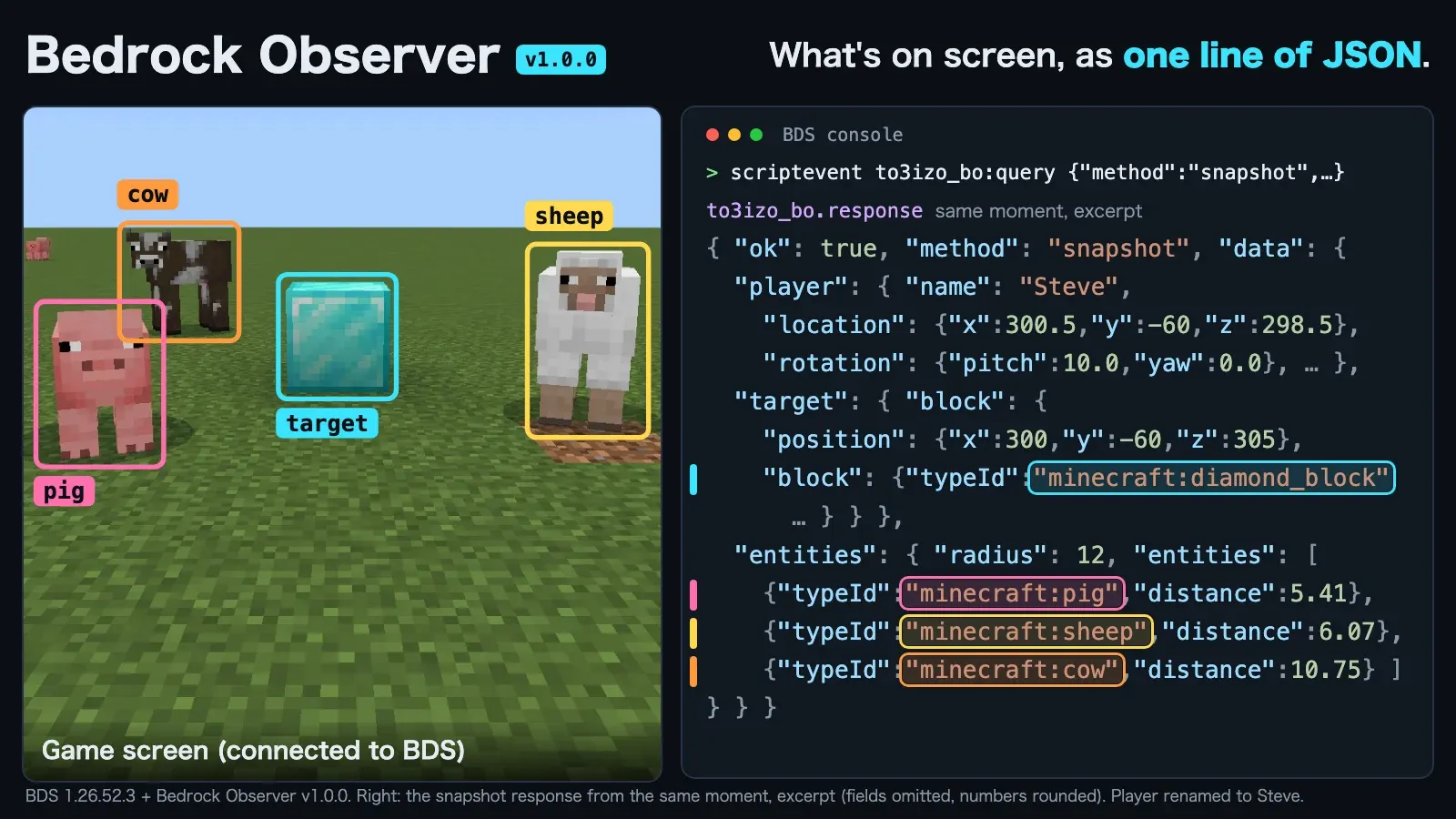 The game screen and the snapshot response from the same moment. The mobs and the block the player looks at come back as typeIds.
What can you learn?
Each kind of request (method) tells you something different.
| Method | Answers |
|---|---|
capabilities |
Versions, methods, limits and defaults — call this first |
players / player |
The list of players, and position, rotation, view direction, velocity and game mode; health, inventory, equipment and effects are optional |
block / blocks / target |
Blocks by coordinates, and the block a player is looking at |
entities / entity |
Nearby entities, sorted by distance, filterable by type, family, name and tag |
top / tops |
Ground height (the topmost block of a column) |
scoreboard |
Objectives and scores |
snapshot |
Several of the above for one player, in one response |
events |
Recent game events again |
Chat messages, command use, screens and input cannot be observed.
Try it
Send a request on the BDS console (no leading /).
scriptevent to3izo_bo:query {"requestId":"c1","method":"capabilities"}
scriptevent to3izo_bo:query {"requestId":"p1","method":"player","params":{"player":{"name":"Steve"},"include":["health","effects"]}}
Each request is answered by exactly one line on standard output.
to3izo_bo.response {"protocol":1,"requestId":"p1","ok":true,"method":"player","tick":144897,"session":"rohuvqp7","seq":4,"time":1792311918513,"data":{"id":"-8589934591","name":"Steve",...}}
Match responses to requests by requestId. When something fails, you get "ok":false and a stable error code.
Game events arrive without a request
Joins, leaves, spawns, deaths involving players, and dimension, game mode and game rule changes are printed as to3izo_bo.event {...} lines, with no request needed. The image below is an example from the moment a zombie killed the player: cause is entityAttack and killer is minecraft:zombie.
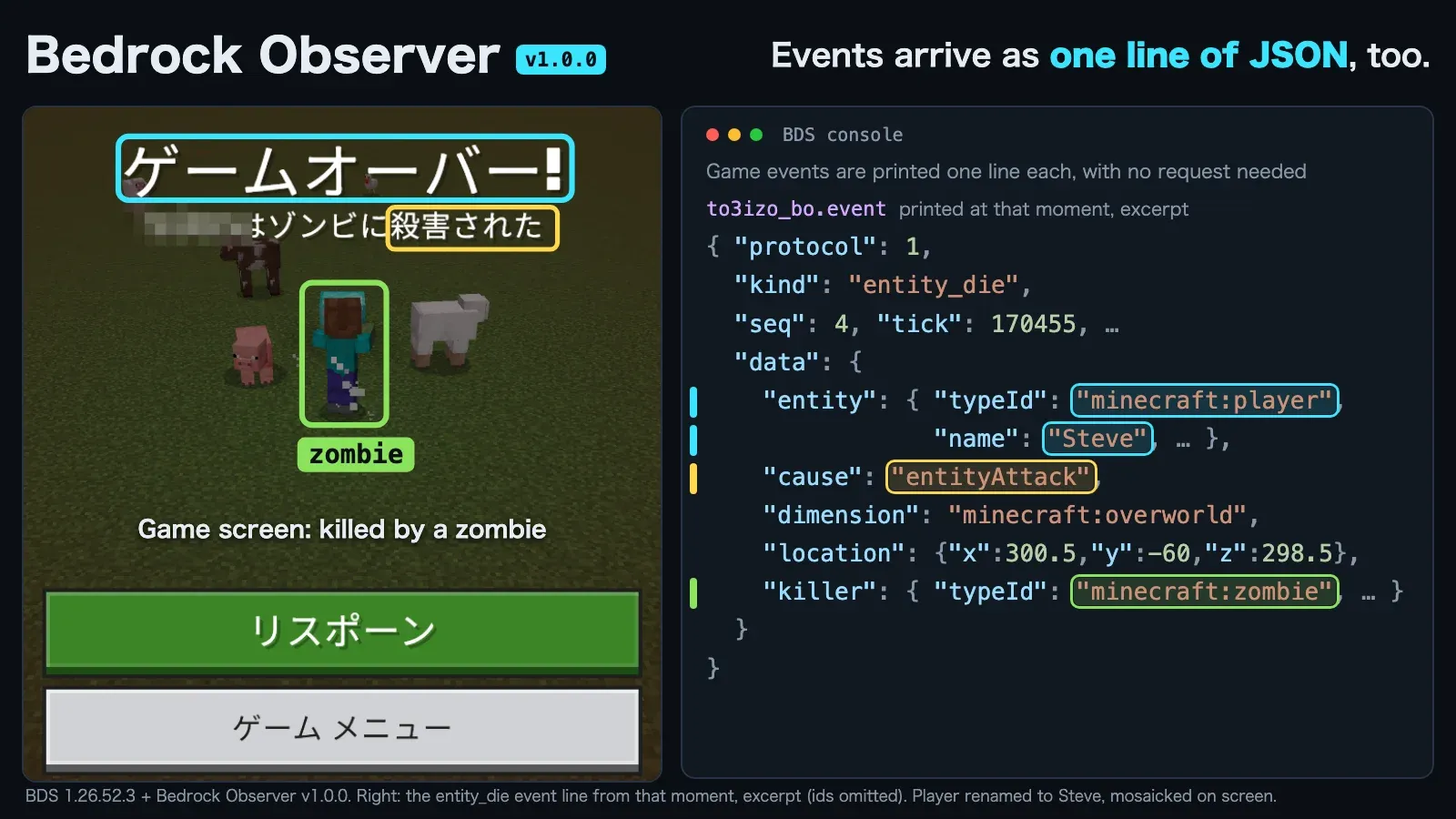 The entity_die event printed at the moment of the death.
From chat, or from another machine
- An operator can send the same request from chat without enabling cheats, in the form
/to3izo_bo:query "{\"requestId\":\"p1\",\"method\":\"player\"}". A long command disconnects that player, so keep it under about 448 characters. - When the tool runs on a different machine from BDS (for example, an agent on a Mac and BDS in a Windows VM), send requests to the console through the VM’s own channel and read the log through the same channel.
- The add-on has no network transport. If lines must travel over a network, forward them with a program outside Minecraft.
How to install
- Download the
.mcaddonfile from the distribution page and unzip it as a zip file. - Copy
be-observer_BPinto<BDS>/behavior_packs/andbe-observer_RPinto<BDS>/resource_packs/. - Add the pack UUID and version to the world’s
world_behavior_packs.jsonandworld_resource_packs.json(the values are on the add-on’s page). - Set
content-log-console-output-enabled=trueinserver.propertiesand start the server. Without it, script output never reaches standard output.
When the log shows [Scripting] [be-observer] scripts loaded, you are ready.
Requirements
- Bedrock Dedicated Server (verified: Windows, 1.26.52.3), game version 1.26.50 or later.
- Linux BDS is expected to work but is untested.
- No experimental features are needed.
Notes
Observations include player names, positions and inventories, and they are written to the server’s standard output. The server console and every operator can observe every player; other players cannot send requests. When you use it on a server other people join, tell the participants about this.
Distribution and license
- Distribution: this site (TO3iZO Crafters). You can download the
.mcaddonfile directly from the Bedrock Observer page. - License: MIT
Summary
Bedrock Observer is for people who want to read the state of the game from a program.
- Good for: people who debug or test add-ons, and people who want an AI agent to play Bedrock.
- Keep in mind: it is not an add-on for playing, and it is BDS-only. It does not work in client-hosted worlds or Realms.